Status embeds
Put your vendors' live status in your README
Pick the providers your project depends on and copy one line into a README, wiki, dashboard, or internal status page. It is a plain SVG image, so it renders anywhere an image does, updates itself, and costs you nothing. No account, no key, no script tag.
Preview
This is a sample stack. Pick your own below and the snippets update.
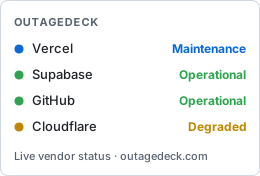
The badge follows the reader's light or dark system theme on its own. Append &theme=light or &theme=dark to pin one.
Markdown (README)
[](https://outagedeck.com/stack?p=vercel,supabase,github,cloudflare)HTML (wiki, dashboard)
<a href="https://outagedeck.com/stack?p=vercel,supabase,github,cloudflare"><img src="https://outagedeck.com/embed/wall.svg?p=vercel,supabase,github,cloudflare" alt="Live status for Vercel, Supabase, GitHub and 1 more | OutageDeck" /></a>Image URL
https://outagedeck.com/embed/wall.svg?p=vercel,supabase,github,cloudflareOne provider, or one service
Use a single-line Vercel badge from OutageDeck, the official Shields.io route if the rest of your README already uses Shields, or narrow it to a single service.

OutageDeck Markdown
[](https://outagedeck.com/providers/vercel)Shields.io Markdown
[](https://outagedeck.com/providers/vercel?utm_source=shields&utm_medium=badge&utm_campaign=shields_provider_status)The first selected provider is used here. Pick another stack to change it, or open the provider directory for a ready-made snippet on any provider page. Shields.io caches its badge for 10 minutes and supports its usual label, color, style, and logo parameters.
Narrow it to one service
Every tracked service publishes its own badge, so a README can say which part of a vendor it depends on. Here is a ready-to-copy example for Vercel Analytics.
Service Markdown
[](https://outagedeck.com/services/vercel-analytics)For a different service, copy the snippet from its own page: the Vercel Analytics page carries this exact one. Open any service listed on a provider page to copy that service's badge.
What you can rely on
- It stays current. Every tracked provider is re-read from its official status feed about every 10 minutes, and the image is cached for 5 minutes at the edge.
- It costs you nothing. Badges sit outside API keys and rate limits, so you can hotlink them from a public README without an account.
- It is honest about its source. Statuses come from each vendor's own published feed, never from crowd reports or scraping, so an embed never shows a red vendor its own status page calls green.
- Nothing about it is tracked to you. The selection lives in the URL; there is no account behind an embed and nothing is stored when someone loads it.
Want to be told instead of checking? Free email alerts cover up to 5 providers, and the live board answers the same question in the browser.